A front desk
in every room.
Guests scan the QR code in their room, ask questions in their own language, order room service and report problems. Your team sees it instantly and the right department takes care of it.
- No app to download
- QR cards and setup included
- No credit card required
Flawless service in three steps.
Place QR cards in rooms
Every room gets its own QR card. Put it on the nightstand or the desk and you're done.
Guests scan and ask
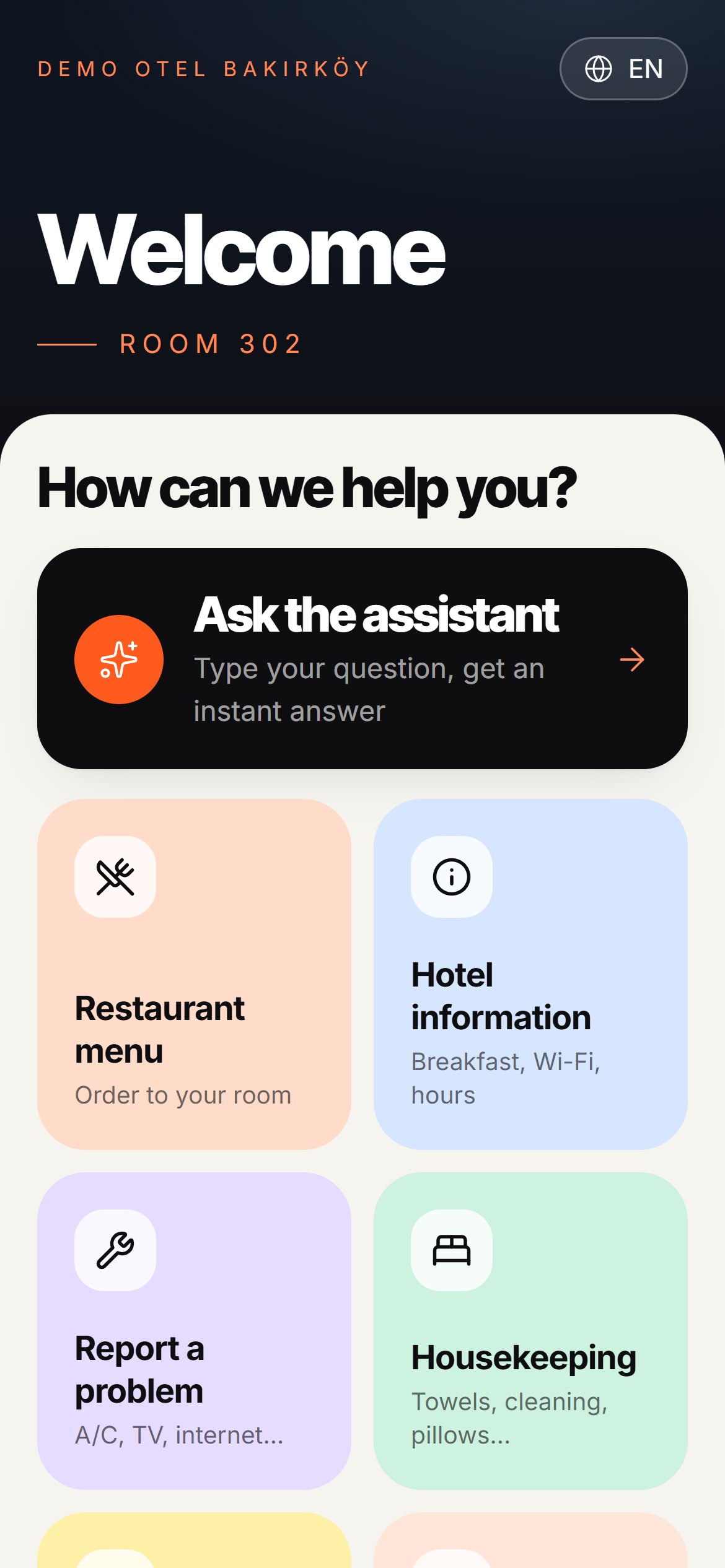
They scan with the phone camera and pick their language. Ask a question, order food, report a problem. No app, no sign-up.
Your team sees it instantly
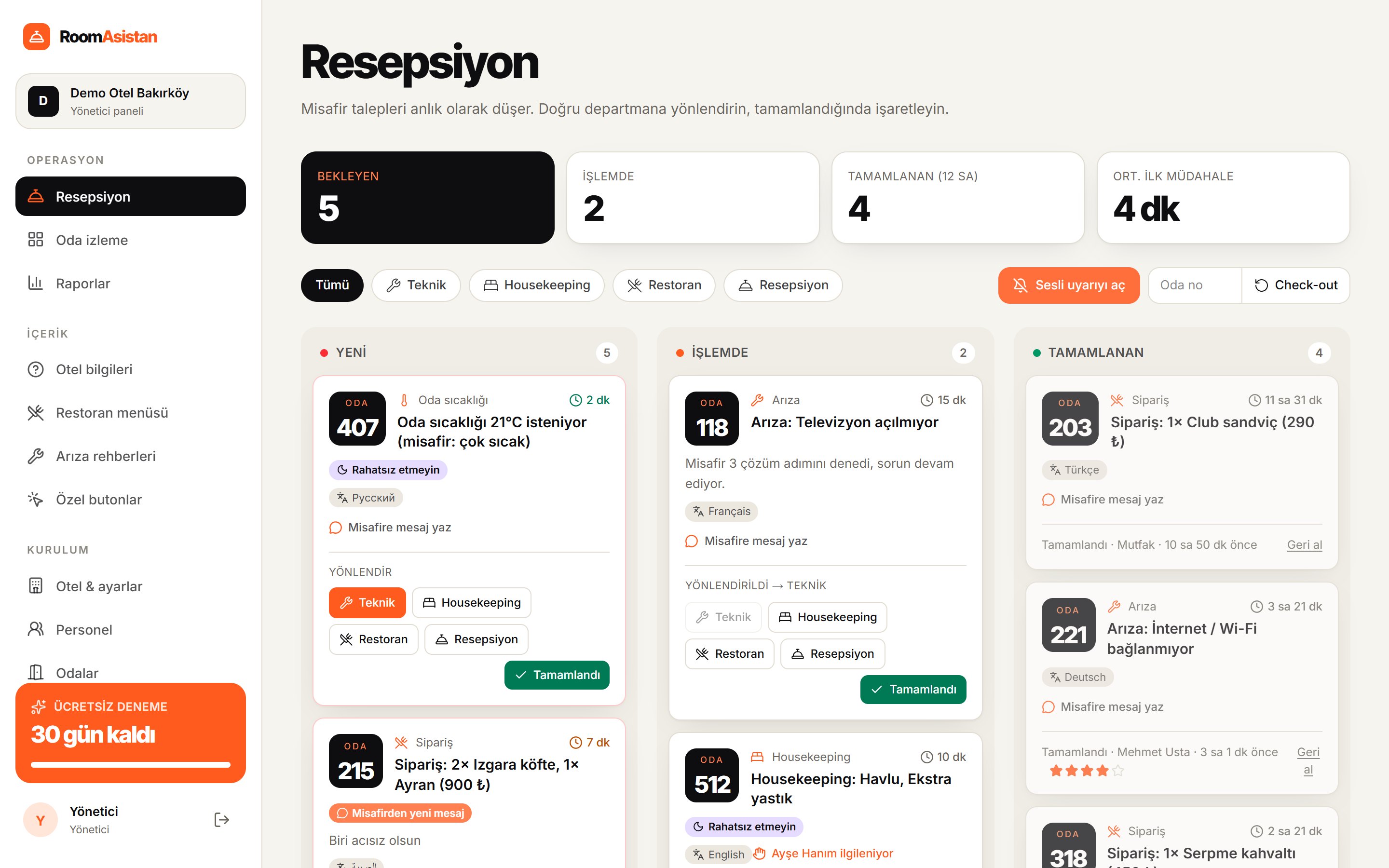
Requests land on the reception screen with a sound alert and go to the right department in one click. Guests follow the status live.
Everything a guest needs, in one QR code.
Large buttons for elderly guests, their own language for international guests, written requests for those who'd rather not call. Easy for everyone.
Digital concierge
“When is breakfast?”, “Wi-Fi password?”, “Taxi?” Answers instantly; anything that needs staff goes straight to reception.
Room service with photos
Menu, prices, options and allergens. Orders go straight to the kitchen and reception.
Step-by-step troubleshooting
“Insert your key card, press the power button…” If that doesn't fix it, it arrives as “Room 302 · AC not working”.
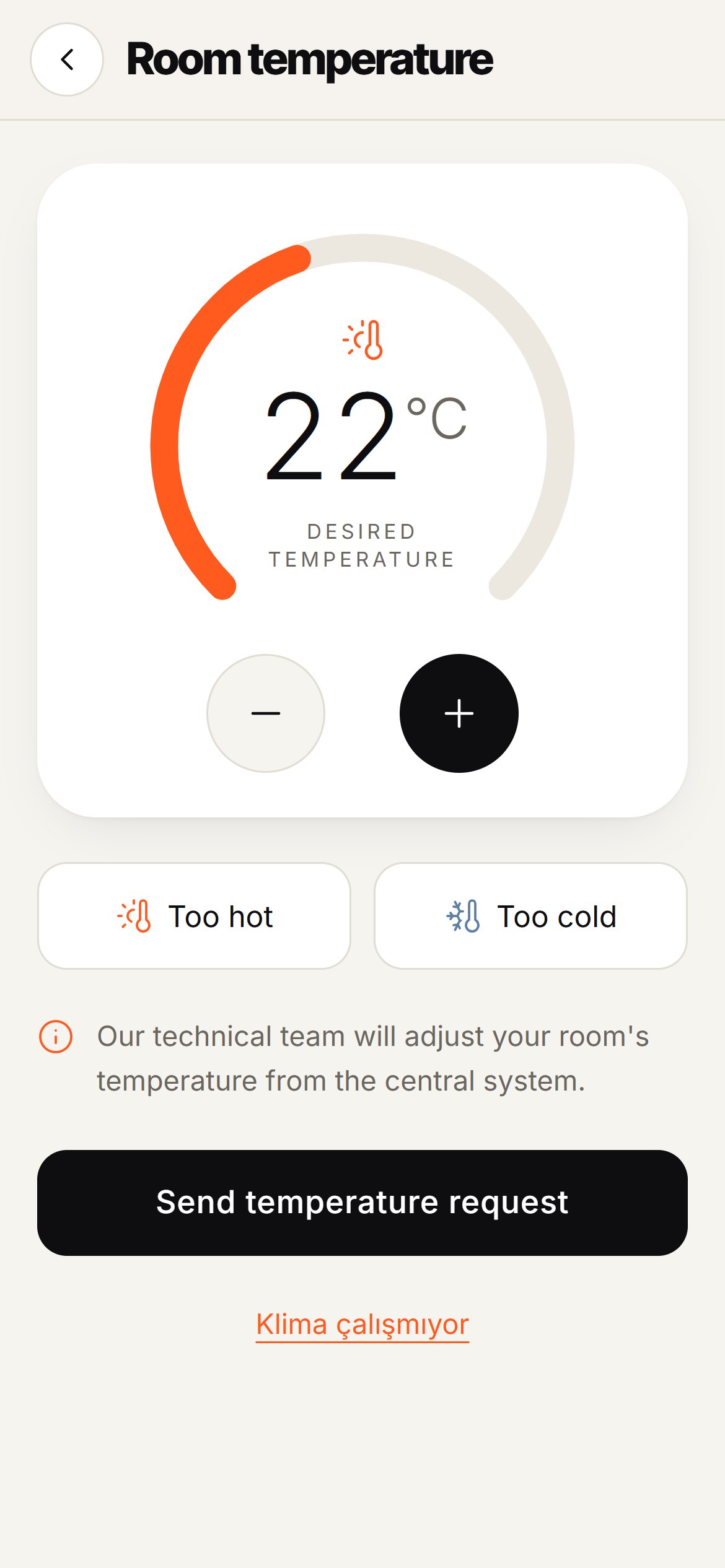
Room temperature
Guests choose the temperature they want; maintenance sets it.
Housekeeping
Towels, cleaning, an extra pillow. One tap.
Chat with reception
Quick replies reach guests in their own language: “Ekibimiz yolda” → “Our team is on the way”.
Ratings and Google reviews
Guests rate each completed request, then see a link to review you on Google.
16 languages, one tap
Guests pick their language on the first screen; Arabic and Persian read right to left.
Wake-up calls and taxis
Guests pick a time and reception gets a reminder when it's due. A taxi now or later.
Do not disturb
One tap to turn on; housekeeping and reception see it right away in room monitoring.
Wi-Fi and custom buttons
Copy the Wi-Fi password with one tap. Spa, location, offers: add your own buttons.
No request gets lost. No guest is kept waiting.
Reception runs it all from one screen
- New requests arrive with a sound alert
- The system suggests the right department; forward it in one click
- Instant WhatsApp notification to the department
- Waiting times turn red, and managers are alerted about delays
- Room monitoring: QR session open, online, do not disturb, pending requests
- Reset a room in one click at check-out
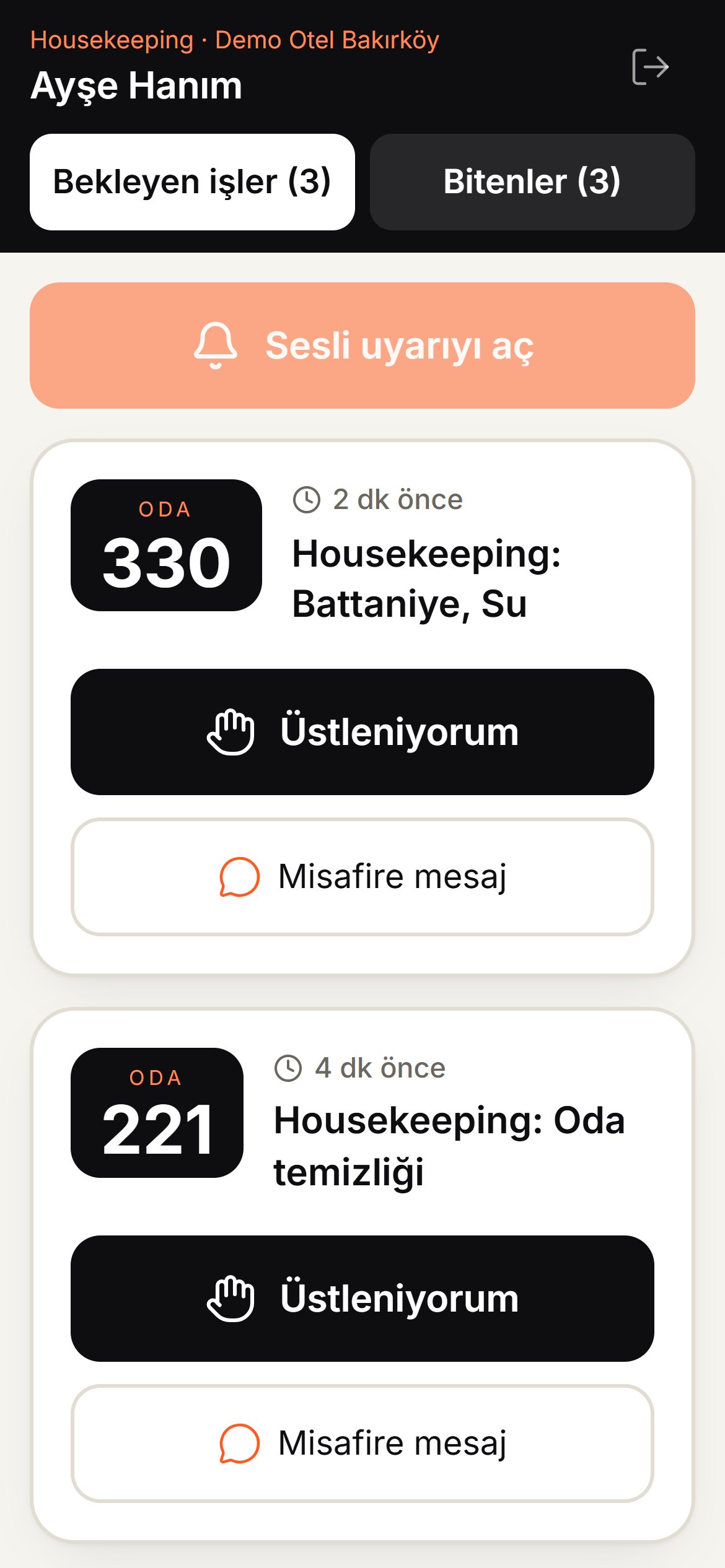
Staff work from their own phones
Maintenance, housekeeping and kitchen staff sign in with a personal PIN and tap big “I'm on it” and “Done” buttons. Ready-made messages to the guest take one tap.
Turn it on or off per department. If your staff would rather not use phones, everything runs from reception and departments just get WhatsApp notifications.
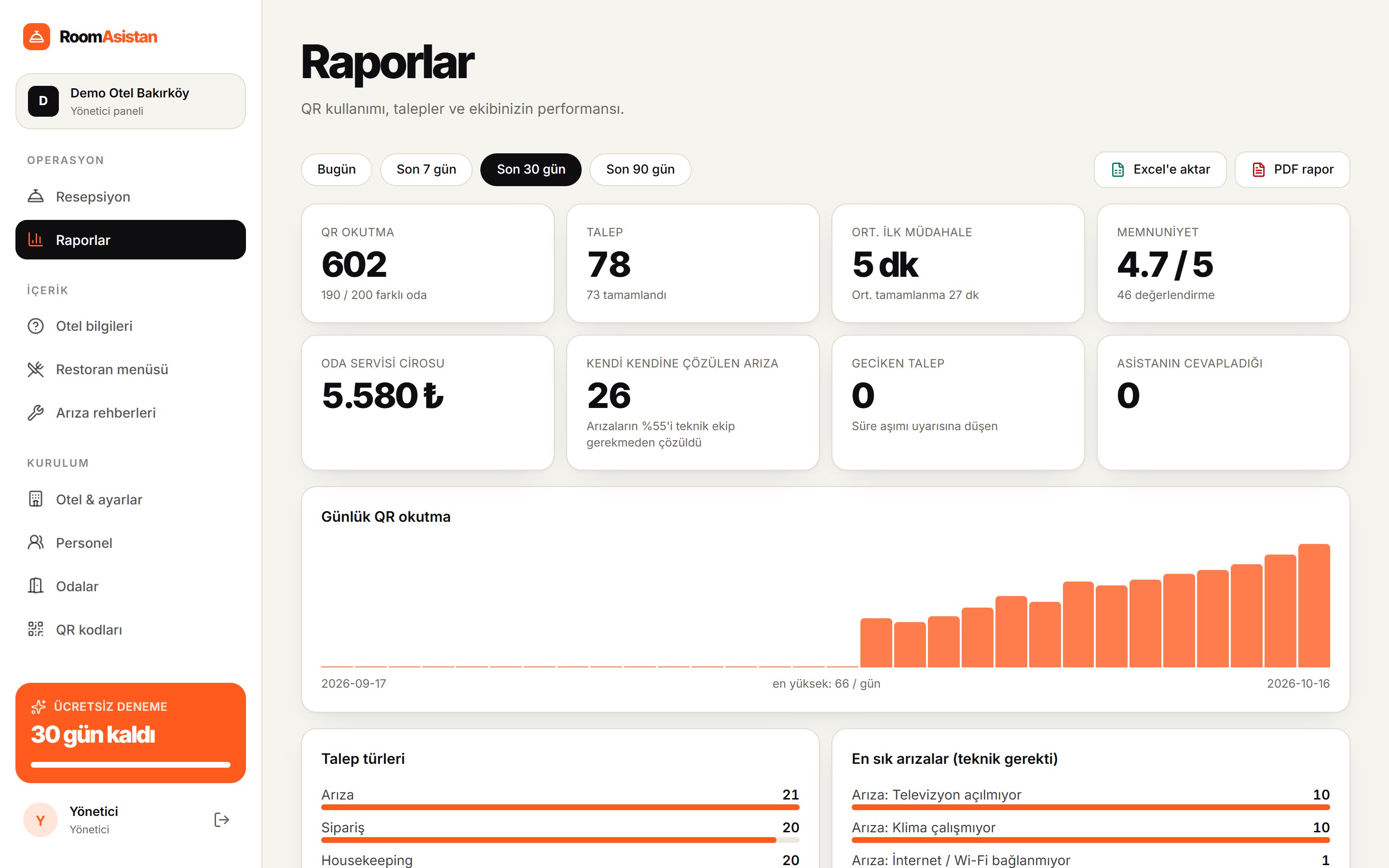
Clear reports for owners
- Scans, requests and average response time
- Guest satisfaction and low ratings
- Performance by staff member
- Recurring faults and the rooms with the most requests
It doesn't replace your PMS. It works alongside it.
No integration needed
Your hotel software, channel manager and booking system keep working as they are. RoomAsistan only adds a guest communication layer.
Live in a day
We enter your information together and prepare QR cards for every room. The next morning your guests are asking about breakfast by QR.
Fits your workflow
Run everything from reception, or let each department work from their own phones. You decide per department.
Before and after.
- The front desk phone never stops ringing
- Language barriers with international guests
- Requests get lost on sticky notes
- Nobody knows who is doing what
- Guest satisfaction can't be measured
- Routine questions and requests flow through the screen
- Guests choose their own language from 16
- Every request is logged and tracked live
- You see who claimed and who closed each request
- Ratings, response times and performance in reports
For every hotel and every guest.
Your guests' data. Your hotel's reputation.
Encrypted in transit and at rest
All traffic is encrypted with TLS 1.3. Data is stored encrypted with AES-256 on Cloudflare's infrastructure.
Guest data stays in the hotel
What guests write is only visible in your hotel dashboard; WhatsApp notifications only carry the room number and request type. No name, phone number or account is required.
Automatic data deletion
What guests write is deleted automatically after the period you choose (180 days by default).
Two-factor authentication
Manager sign-ins require an Authy / Google Authenticator code. Everyone has their own PIN; sign-in locks after failed attempts and every action is logged.
Room-specific, time-limited QR
Sessions end after 12 hours or with one click at check-out. A shared QR code can be renewed instantly.
Automatic backups
The database is backed up continuously; we can restore any point in the last 30 days.
99.9% uptime commitment
The system is monitored around the clock. On request we sign an SLA covering uptime, privacy and data security; if we miss the commitment, you get a refund on your monthly fee.
Simple pricing. No surprises.
Try it free for 30 days. No commitment, cancel anytime. 10% off with yearly billing.
- QR room assistant in 16 languages
- Chat with reception
- Menu and room service with photos
- Housekeeping and troubleshooting guides
- Wake-up calls, taxis, do not disturb
- Room temperature requests
- Wi-Fi card
- Room monitoring and guest blocking
- Ratings and Google reviews
- WhatsApp notifications
- Basic reports
- Staff phone screen and department workflow
- Advanced reports and staff performance
- Excel and PDF export
- Weekly email report
- Delay alerts
- 24/7 priority support
- Custom buttons (button builder)
- Dedicated account manager
- Guided setup and staff training
- SLA and data processing agreement
Pay only for the rooms you use.
- Everything in Premium
- No fixed plan
- From 10 rooms
- Ideal for seasonal hotels
A locked tablet in every room.
The in-room tablet only opens RoomAsistan; settings, other apps and the open internet are locked. Guests can also open the same screen on their own phone by QR.
- Everything in Elite
- In-room tablet (kiosk mode)
- Tablet setup and lockdown
- 300+ rooms and hotel chains
- Custom development for your hotel
- Start with a pilot in a few rooms
All plans include a 30-day free trial, QR cards and setup. Prices exclude VAT and local taxes. Tablet hardware is priced separately in Enterprise quotes.
Frequently asked questions.
Do guests need to download an app?
No. They scan the QR code with their phone camera and the page opens in the browser. No sign-up, password or app.
Which languages are supported?
Turkish, English, German, Russian, Arabic, Persian, French, Spanish, Italian, Dutch, Polish, Ukrainian, Azerbaijani, Chinese, Japanese and Korean. Guests choose their language on the first screen.
How long does setup take?
Your system is ready in 10 minutes: we create your hotel account, add your rooms and ready-made troubleshooting guides, and set up staff PINs. We enter your details (breakfast hours, Wi-Fi, menu…) together and prepare QR cards for your rooms.
Our staff aren't very tech-savvy. Is that a problem?
No. The staff screen has big buttons and opens with a PIN. You don't have to use it at all: every request goes to reception and departments just get WhatsApp notifications. You can choose this per department.
Is guest data safe?
Connections and storage are encrypted, what guests write is only visible in your hotel dashboard (notifications only carry the room and request type), and it is deleted after the period you choose. On request we sign an SLA and a data processing agreement.
Does it work with our hotel software (PMS)?
RoomAsistan currently works independently of your existing systems, so you don't have to change anything. PMS integrations are on our roadmap.
Can we put tablets in the rooms?
Yes, with our Enterprise plan. The in-room tablet only opens RoomAsistan; settings, other apps and the open internet are locked. We start with a pilot in a few rooms and agree the price based on the number of tablets. Guests can also open the same screen on their own phone by QR.
What happens when the trial ends?
After 30 days, if you'd like to continue, you move to the plan that fits your room count (or Flex, paid per room). Yearly billing is 10% off. If not, you owe nothing.
Can reception see whether a guest is in the room?
The room monitoring screen shows at a glance which rooms have an open QR session, whether the guest is online, do-not-disturb status and pending requests.
Try RoomAsistan free for 30 days.
QR cards, setup and staff training included. No credit card required.